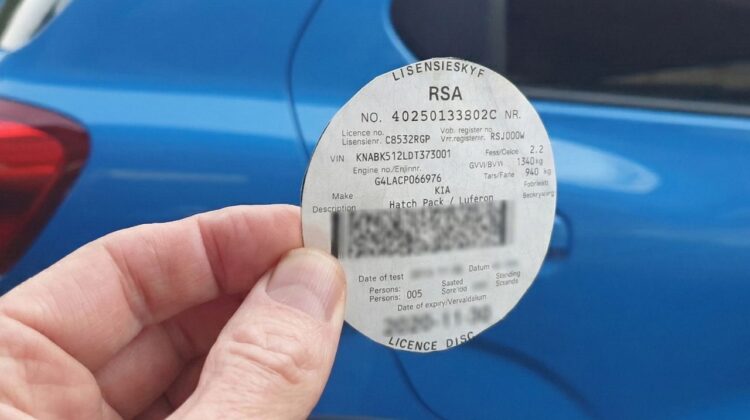
If there is one yearly errand that every South African car owner dreads, it is renewing their Vehicle License Disc.
For decades, this meant taking a half-day off work, driving to the nearest Post Office, standing in a queue for three hours, and praying that the printer ink didn’t run out or the dreaded “System Offline” sign didn’t appear.
But times have changed.
With the South African Post Office (SAPO) facing financial struggles and closing many branches, the government and private sector have stepped up. In 2026, you absolutely do not need to stand in a queue to renew your license.
You can now do it while buying your groceries at Checkers, while banking on your FNB app, or even from your couch using the official eNaTIS website.
However, each service comes with different Admin Fees and Delivery Times. Some are cheaper, some are faster.
In this ultimate guide, we will compare the 5 Best Ways to Renew Your Car License Disc Online, break down the costs, and help you choose the method that saves you the most time and money.
Important Rules Before You Start
Before you log in anywhere, make sure you are actually eligible to renew.
1. The 21-Day Grace Period
Your license disc expires on the date printed on it. However, you have a 21-day grace period after that date to renew without penalties.
Warning: If you are caught driving with an expired disc after the grace period, traffic officers can fine you (usually R1000+).
2. Outstanding Fines Block Renewals
This is the most common reason for rejection. If you have “Enforcement Orders” (unpaid traffic fines that have gone to court status) against your name, the system will block your renewal.
Check: Verify you don’t have blocking fines on viewfines.co.za or paycity.co.za first.
3. Roadworthiness
Your car must have a valid Roadworthy Certificate (mostly relevant for buses/trucks, or if the car changed owners recently). For private cars, this is usually valid as long as the car is licensed annually.
Method 1: eNaTIS Portal (The Official Government Way)
This is the direct route through the National Traffic Information System.
- Best for: People who want the cheapest admin fee.
- Website:
online.natis.gov.za
How to do it:
- Register a profile on the website (Upload ID copy and Proof of Residence).
- Click on “My Car” / “Renew Vehicle License”.
- Enter your banking details to pay via credit card or EFT.
- Choose delivery (Courier) or collection.
The Cost:
- License Fee: Standard (depends on your car’s weight).
- Admin/Service Fee: R72 (Delivery fee included).
- Verdict: It is often the cheapest option, but the website interface is old and can be glitchy during peak times.
Method 2: Checkers and Shoprite (Money Market)
Did you know you can renew your disc while buying bread and milk?
- Best for: Convenience while shopping.
- Requirements: You must bring your ID and current License Disc.
How to do it:
- Go to the Money Market counter at any Checkers, Shoprite, or Usave.
- Present your ID and current disc.
- Pay the fee at the till.
- Delivery: You don’t get the disc immediately. It is couriered to your door or the store within 5-10 working days.
The Cost:
- Admin Fee: Around R185 (Includes courier).
- Verdict: Very convenient, but slightly more expensive than eNaTIS.
Method 3: Pick n Pay (Online & In-Store)
Pick n Pay has a dedicated portal for renewals.
- Best for: Pick n Pay loyalists.
- Website:
pnp.co.za/money/value-added-services/vehicle-license
How to do it:
- Register on the PnP online portal.
- Upload your documents.
- Pay online.
- Courier delivery to your door.
The Cost:
- Admin Fee: Approximately R250 (Service fee + Delivery).
- Verdict: One of the more expensive options, but their system is reliable and user-friendly.
Method 4: FNB App (For FNB Clients Only)
If you bank with FNB, this is arguably the smoothest experience of all.
- Best for: FNB customers who hate uploading documents repeatedly.
- App: nav» Car section.
How to do it:
- Open the FNB App.
- Go to nav» > Car > Renew License Disc.
- Scan your current disc barcode with your phone camera.
- Pay directly from your bank account.
- They use your existing FNB address for delivery.
The Cost:
- Admin Fee: R199 (Includes courier).
- Note: You can pay with eBucks if you have them!
- Verdict: The “Gold Standard” for ease of use, but limited to FNB clients.
Method 5: WhatsApp Services (ChatBack / Disky)
There are third-party services that operate entirely on WhatsApp. “ChatBack” and “Disky” are the most famous.
- Best for: People who live on WhatsApp and hate filling in forms.
- How: You save their number, send a message, snap a photo of your disc and ID, and pay via a generated link (Zapper/SnapScan/Card).
The Cost:
- They are usually the most expensive options because you pay for the extreme convenience.
- Admin Fee: Can range from R300 to R450 depending on the service provider.
Method 6: The Post Office (The Old School Way)
Yes, you can still go to SAPO if you want to save on courier fees and walk out with the disc immediately.
- Best for: People who need the disc TODAY (Instant gratification) and have time to queue.
- Cost: R72 (Transaction fee) + License fee. No courier cost.
Pro Tip:
If you must go to a Post Office, go mid-month on a Tuesday or Wednesday. Avoid month-end (SASSA grant days) and lunchtimes, or you will be stuck in queues for hours.
Summary Comparison Table
(Note: Prices are estimates and subject to change by service providers)
| Method | Admin/Delivery Fee (Approx) | Convenience | Delivery Time |
| Post Office (Walk-in) | R72 | Low (Queues) | Instant |
| eNaTIS Online | R99 – R170 | Medium | 3-5 Days |
| Checkers / Shoprite | R185 | High | 5-10 Days |
| FNB App | R199 | Very High | 5-7 Days |
| Pick n Pay | R250+ | High | 5-10 Days |
| WhatsApp Services | R300+ | Very High | 3-5 Days |
What Documents Do You Need?
Whether online or offline, the law requires proof of who you are. Always have these ready (digital scans or physical copies):
- Identity Document: Green barcoded ID or Smart Card.
- Proof of Residence: Utility bill, bank statement, or clothing account statement (not older than 3 months).
- Current License Disc: Or the RL83 renewal notice form (if you received one in the mail).
Note on Proof of Residence: If the utility bill is not in your name (e.g., you live with parents), you need an affidavit from the owner stating you live there.
Conclusion: Which Method Should You Choose?
- If you want to save money: Use eNaTIS online or brave the Post Office queue.
- If you bank with FNB: Use the FNB App. It is seamless and allows eBucks payment.
- If you want convenience: Use Checkers or Pick n Pay. You have to buy groceries anyway, so killing two birds with one stone makes sense.
Whatever you do, don’t wait until the last day of the grace period. Systems go offline, couriers get delayed, and fines are expensive. Check your windscreen today!
Did you know expired licenses can affect your insurance claims? Make sure you are fully covered by reading our guide on Car Insurance: Comprehensive vs Third-Party.
(Disclaimer: The Mzansi Post is an independent guide. Prices listed are estimates based on 2025 rates. Please consult the specific service provider for exact quotes.)