If there is one thing every South African dreads, it is a visit to the Department of Home Affairs (DHA). The horror stories of waking up at 4:00 AM, standing in sun-baked queues for hours, and then being told “the system is offline” are legendary in Mzansi.
But did you know you can skip most of that frustration?
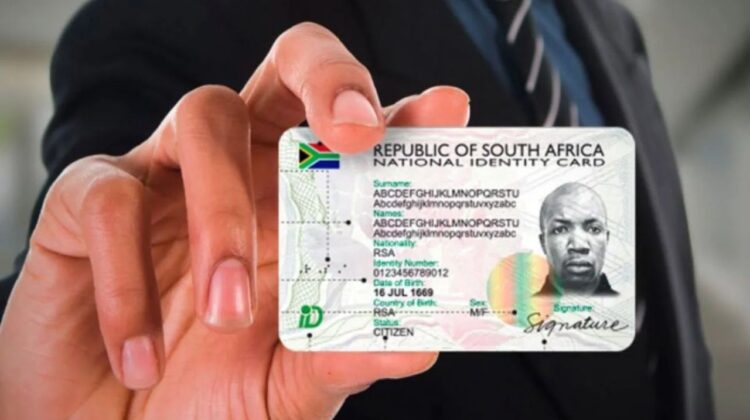
The Department of Home Affairs has introduced the Smart ID Card, replacing the old green barcoded ID book. More importantly, they have launched the eHomeAffairs portal, which allows you to submit your application online and—best of all—complete the process at a participating Bank Branch instead of a chaotic Home Affairs office.
Imagine getting your ID renewal sorted in the comfort of air-conditioned FNB or Standard Bank offices, with a scheduled appointment time. No fighting for a spot in line.
However, the online system can be tricky to navigate if you are not tech-savvy. Websites crash, OTPs (One Time Pins) get delayed, and payment steps can be confusing.
In this comprehensive guide, we will walk you through the entire process step-by-step. From registering your account to picking up your new card, here is everything you need to know about getting your Smart ID in 2026.
What is the Smart ID Card?
The Smart ID is a modern, credit-card-sized identity document that replaces the bulky green ID book. It has advanced security features (like a microchip) to prevent identity theft and fraud, which is a major problem in South Africa.
Who Can Apply?
Currently, the online system is open to:
- First-time applicants: Youth aged 16 years and older.
- Pensioners: Citizens aged 60 years and older.
- Re-issues: Anyone who has lost their ID or simply wants to upgrade from the green book to the Smart Card.
Note: Permanent Residents usually still have to visit a Home Affairs office directly, as the online system is primarily for SA Citizens.
How Much Does It Cost?
- First-time applicants (16-year-olds): FREE.
- Pensioners (60+): FREE.
- Replacement / Upgrade (Lost ID or Green Book swap): R140.
Phase 1: Registering on eHomeAffairs
Before you can book anything, you need an account. You will need a computer or smartphone with a stable internet connection.
Step 1: Go to the Official Website
Visit the eHomeAffairs portal here: https://ehome.dha.gov.za/ehomeaffairs (Warning: There are many scam sites. Ensure the address ends in .gov.za).
Step 2: Create a Profile
- Click on “Register”.
- Enter your personal details: Name, ID Number, Email Address, and Cellphone Number.
- Crucial: Use a phone number you have access to right now. You will receive an OTP (One Time Pin) to verify your account.
Step 3: Verification
Once you submit, check your phone for the OTP SMS. Enter it on the screen to activate your profile.
- Troubleshooting: If the OTP doesn’t arrive (which happens often during load shedding or network congestion), wait 5 minutes and click “Resend”. Do not spam the button, or you might get locked out.
Phase 2: The Application Process
Now that you are logged in, you can start the application for your Smart ID (or Passport—the process is similar).
Step 1: Start a New Application
- Click “Create New Application”.
- Select who you are applying for (Yourself or a Minor).
- Select “Smart ID Card”.
Step 2: Fill in the Form
You will be asked to confirm your personal details (Marital status, address, etc.). Ensure everything matches your official records.
Step 3: Upload Supporting Documents
This is the part where many people get stuck. You need to upload digital copies of your documents.
- For First-Timers: Birth Certificate, Copy of Mother/Father’s ID.
- For Replacements: Just your ID number is usually sufficient, but having a copy of your old ID helps.
- Format: Files must be in PDF, JPG, or PNG format and usually under 2MB in size.
Tip: You don’t need a scanner. Use a free app like “Adobe Scan” or “CamScanner” on your phone to take a clear photo of your documents and convert them to PDF.
Phase 3: Making the Payment (R140)
This is the most critical step. You cannot pay cash at the bank branch. Payment must be facilitated through the online portal.
- At the end of the application, you will be prompted to pay.
- Select your bank from the list (ABSA, Capitec, Discovery Bank, FNB, Investec, Nedbank, Standard Bank).
- Enter your Bank Account Number.
- Important: The system does not take the money immediately. It sends a “Payment Request” to your banking app.
- Log in to your Banking App. Go to “Payments” or “Approvals”. You should see a request from the Department of Home Affairs.
- Authorize the payment. Once approved, the status on the eHomeAffairs website will update to “Paid”.
Note: If you are applying as a 16-year-old first-timer or pensioner, the fee should show as R0.00.
Phase 4: Booking Your Appointment (The Best Part)
Once payment is captured, the system unlocks the booking calendar.
Step 1: Choose Your Branch
You have two choices:
- Home Affairs Office: The traditional government office (Expect queues).
- Bank Branch: A specialized Home Affairs desk inside a bank (Much faster).
Which Banks Offer This Service?
Not every bank branch offers this. It is usually the larger main branches in city centres. Participating banks currently include select branches of:
- ABSA
- FNB (First National Bank)
- Nedbank
- Standard Bank
- Discovery Bank
- Investec
Strategy: Search for branches in your province. If the slots at “Standard Bank Sandton” are full, try “FNB Portside” or a branch in a neighboring suburb.
Step 2: Select a Date and Time
Choose a slot that suits you. The system allows you to book specific times (e.g., 10:30 AM).
Step 3: Print Your Confirmation
Once booked, you will get a Confirmation Letter (B-346 form) with a QR code.
- Download this PDF.
- You do not necessarily need to print it physically if you have it on your phone, but having a printed copy is safer in case your phone battery dies.
Phase 5: Visit the Bank (Biometrics)
On the day of your appointment:
- Arrive Early: Get there 15 minutes before your slot.
- What to Bring:
- Your Green Barcoded ID Book (if you have one).
- The Appointment Confirmation Letter (QR Code).
- Your physical ID/Birth Certificate copies (just in case the digital upload failed).
- The Process:
- Go to the designated Home Affairs desk inside the bank.
- They will scan your QR code.
- Biometrics: They will take your fingerprints digitally.
- Photo: They will take your ID photo right there (No need to bring your own passport photos!).
- Signature: You will sign on a digital pad.
The whole process at a bank usually takes less than 20 minutes. Compare that to 6 hours at a normal Home Affairs office!
Phase 6: Collection
After your visit, the application goes to the Government Printing Works.
- Waiting Time: It usually takes 2 to 4 weeks.
- Notification: You will receive an SMS saying: “Your Smart ID is ready for collection at [Branch Name].”
Collection Rules:
- You must collect it yourself (Biometrics are required again to verify it’s you). You cannot send someone else.
- Bring your old Green ID Book (they will cancel it by cutting a corner off).
Frequently Asked Questions (FAQ)
No. Security at the bank will not let you access the Home Affairs desk without a booking confirmation letter.
Generally, yes and no.
In the past, you could visit any bank.
Recently, some banks (like FNB and Standard Bank) prefer assisting their own clients first. However, the system often allows you to book any available branch. If the system lets you book it, you are allowed to go there.
While rare, banks rely on the Home Affairs network. If the DHA system goes down nationally, the bank cannot process you. However, banks usually have backup generators, so load shedding is less of an issue than at government offices.
This is a common glitch. If you approved it in your app but the website says “Unpaid”:
Refresh the page.
Log out and log back in.
Check your bank statement to ensure money left your account.
If it persists for 24 hours, contact your bank to reverse the transaction and try again.
Conclusion
Getting a Smart ID Card in 2026 does not have to be a nightmare. By using the eHomeAffairs online portal and booking a slot at a bank branch, you are saving yourself hours of stress.
Not only is the Smart ID more secure and durable than the old green book, but it is also becoming mandatory for many modern digital services in South Africa.
Ready to apply? Make sure you have your internet banking app ready and a clear copy of your ID, then head over to the eHomeAffairs website to start.
Disclaimer: The Mzansi Post is an independent information guide. We are not affiliated with the Department of Home Affairs. For official queries, please contact the DHA helpline.